To check your palm reading at home with your mobile, photograph your dominant palm flat in good natural light, with the camera directly above it. Then read the heart, head, life and fate lines, or upload the photo to an AI palm reading app like Astrova AI for an instant line-by-line reading.
This guide explains how to perform a palm reading at home using just your mobile phone, while also highlighting the Astrova astrology app. We cover step-by-step camera setup (lighting, hand positioning, focus) to capture a clear palm image. We then explain the major palm lines (Life, Heart, Head, Fate) and mounts (Venus, Jupiter, Saturn, Apollo, Mercury) with reference to reputable sources. We discuss how Astrova’s AI-powered app augments this process – letting you enter your birth date and (optionally) upload a palm photo to get automated insights – and note its key features (birth chart analysis, AI insights) and privacy policy. We include practical troubleshooting (e.g. improving poor images), safety and privacy considerations (palmistry is not science, and Astrova states it does not sell or share your data), plus a comparison table of manual vs. app-based methods. An FAQ answers common questions. Overall, this blog provides a comprehensive, actionable blueprint for curious readers to try smartphone-based palm reading while understanding its limits and how Astrova can help.
Introduction
Palm reading (palmistry) is an ancient practice that examines hand lines and shapes to offer insights about personality and fate. Today, smartphone cameras and AI make it possible to do a “palm reading” at home. This blog shows you exactly how to photograph and interpret your palm, and how the Astrova app fits in. We’ll give detailed, honest advice on what you can and can’t expect. (Keep in mind: modern science regards palmistry as pseudoscience, so treat any reading as entertainment or reflection, not fact.)
We begin with hands-on steps: lighting, camera setup and hand positioning to capture clear palm images. Then we explain each major line (Life, Heart, Head, Fate) and each mount (Venus, Jupiter, Saturn, Apollo, Mercury) so you can interpret them. Next, we examine how the Astrova app augments your reading with AI-powered insights – it asks for your birth date (for Kundli/birth-chart analysis) and even lets you upload a palm photo. We cover Astrova’s privacy (it states “No data collected” and does not sell personal data) and its AI features (daily horoscopes, compatibility, etc.). Finally, we include troubleshooting tips, a manual-vs-app comparison, and a short FAQ. Throughout, we focus on clear facts and practical tips – no fluff or vague generalities.
Step-by-Step Mobile Palm-Reading Tutorial
To get useful palmistry results, start with a good photo. The camera must capture all of your palm (wrist to fingertips) sharply and evenly lit. Follow these steps:
- Lighting and background: Use bright, even light. Natural daylight is best. Avoid harsh shadows – as one palm expert notes, “shadows distort line detection significantly”. If indoors, face a window or use a lamp so the palm is illuminated without glare. A plain, contrasting background (e.g. a neutral table or wall) helps the camera distinguish your hand and lines.
- Hand positioning: Place your hand flat and relaxed on the surface, fingers naturally spread so lines aren’t bunched together. Make sure the entire palm is in frame: both the base of your palm (wrist area) and all fingertips should be visible. For odd palm shapes (long or short fingers), you may need slight camera angle adjustments: e.g. angle the camera a bit upwards for a short-fingered hand. Take a moment to steady your hand – using a self-timer or asking someone else to take the shot can reduce blur.
- Camera settings: Use your phone’s main (rear) camera for best resolution. Tap the screen to focus on your palm. If there’s a “manual” or “pro” mode, lock the focus and exposure so the image doesn’t change as you move. Hold the camera perpendicular to your palm (not tilted) so the image isn’t skewed. Keep your hand still when capturing. Take multiple shots of each palm from slightly different angles or distances in case one is clearer.
- Quality check: Examine the photo on your screen. You should see distinct lines (life, head, heart, etc.) without blur or bright reflections. If the image is dark, shadowy, or the hand is out of focus, retake it under better conditions. (Note: some palm-reading apps will reject or flag poor images – so don’t force it.)
By following these steps, you get a sharp, well-lit palm image suitable for reading.
Interpreting Major Palm Lines and Mounts
With a clear palm photo, you can identify the classic features of palmistry. Don’t expect precise predictions, but use these descriptions as a guide:
- Life Line: Curving around the base of the thumb, the life line (Heart Line) reflects vitality and general health, not literal lifespan. A deep, long life line suggests vigor and energy; a faint or broken line may indicate fatigue or major life changes.
- Heart Line: Running horizontally under the fingers, the heart line indicates emotional nature and relationships. A long, deep heart line often means you’re warm-hearted and expressive; a short or faint heart line may imply reservation. Note its start point: if it begins under the index finger you may be content in love; under the middle finger, you might experience more restlessness in relationships.
- Head Line: Stretching across the middle of the palm, the head line represents thinking style and intellect. A straight head line suggests practicality and logic; a curved line indicates creativity. Breaks or forks can mark shifts in thinking or significant events.
- Fate Line (Career Line): Not everyone has a prominent fate line. When present, this vertical line (running from wrist toward middle finger) relates to career and life path. A strong fate line suggests a clear sense of purpose and drive, whereas a weak or broken one implies changing interests or a more flexible, less linear life direction. The absence of a fate line is normal and often means a self-directed life rather than a predetermined path.
- Mounts: These are the fleshy pads under each finger. Their prominence is said to reflect traits related to planets. For example:
- Mount of Jupiter (base of index finger): Confidence and ambition. A well-developed Jupiter mount suggests leadership ability.
- Mount of Saturn (base of middle finger): Wisdom and responsibility. A high Saturn mount implies integrity and strength in adversity.
- Mount of Apollo (Sun) (under ring finger): Optimism and creativity. A prominent Apollo mount indicates artistic talent and happiness.
- Mount of Mercury (beneath the little finger): Communication and wit. A strong Mercury mount points to intelligence and sociability.
- Mount of Venus (around the thumb pad): Love, vitality and sensuality. A rounded Venus mount shows warmth, passion and affection.
Each mount and line does not guarantee outcomes, but may hint at personality tendencies. Keep it simple: look for strong vs faint, long vs short, and intersections. As you read, compare both hands: traditionally the dominant hand (right for right-handers) shows active life and choices, while the other hand shows innate potential.
Using the Astrova App for AI-Powered Readings
The Astrova app (Android) can augment or simplify this process. Astrova is promoted as a personal astrology guide that offers horoscopes, birth-chart (Kundli) analysis, compatibility tests – and notably, “accurate palm reading revealing your life’s path and hidden talents”. Its Google Play listing (updated Jan 2026) emphasizes daily horoscopes, Kundli generation, compatibility, and “AI-powered astrological insights”. Here’s how Astrova fits in:
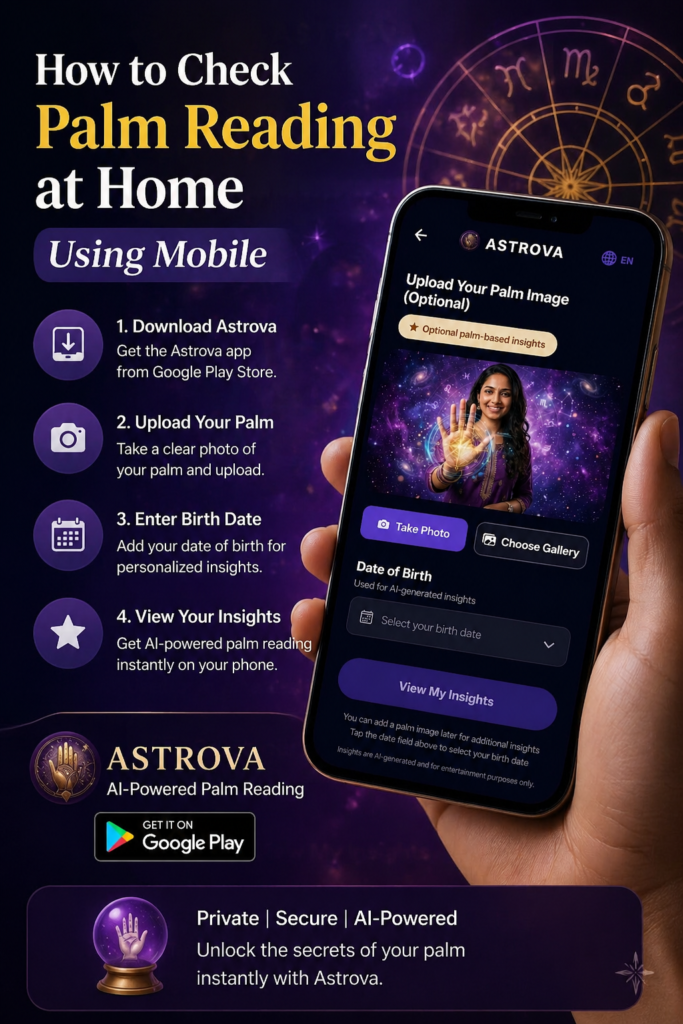
- Set-up: Download Astrova from Google Play (free to install). You’ll need to create an account or sign in (it uses Google Sign-In). Provide your date of birth (for astrological calculations) and answer basic profile questions.
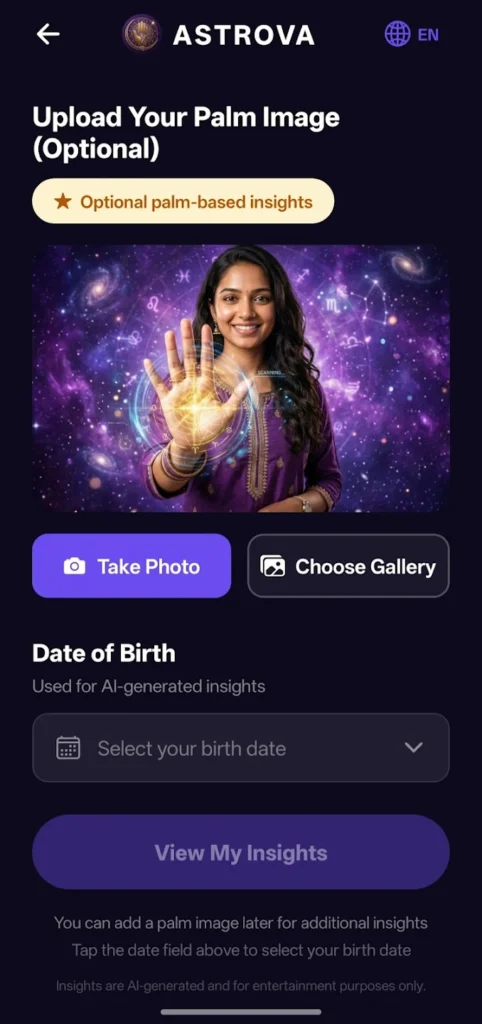
- Palm Image: Astrova’s interface allows you to optionally upload or snap your palm. The home screen in the app (per its images) shows “Upload your Palm Image (Optional)” above a camera icon. If you choose, tap the camera to take a live photo of your palm (following the steps above), or select an existing image. The app then uses AI to analyze the photograph. (If you skip this step, Astrova still uses your birth details for horoscope insights.)
- Analysis & Insights: Astrova combines your palm data with your birth chart. It promises to interpret lines, mounts and markings through its AI engine. In practice, after uploading, it will process the image and then show you personalized readings on-screen. These readings mix palmistry concepts with Vedic/astrological terms, aiming for a narrative-style report. If Astrova follows the model of other AI palm readers, it might ask follow-up questions or compare both hands over time.
- Features & Privacy: According to Astrova’s listing, the app provides ongoing horoscope predictions, compatibility reports, and uses your data only for these insights. The privacy info on Google Play claims “No data collected” and “No data shared with third parties”. However, Astrova’s detailed privacy policy (Apr 2026) notes that it does collect user-provided inputs: name, DOB, any uploaded palm images, etc.. It states these are used only to generate the readings and are never sold or misused. In short, Astrova asks for your data (incl. palm photo) to give you customized results, but it vows not to leak it. It also emphasizes that all “insights” are AI-generated entertainment.
In summary, Astrova aims to make palmistry easy: it guides your photo-taking, runs the analysis, and presents the output. It can save you from manually interpreting each line. But remember its readings are still unverified predictions—the AI is only as good as its programming. Still, if you want a quick, digitized reading, Astrova offers a convenient package.
Safety, Ethics and Privacy Considerations
Be realistic: Palmistry has no scientific basis. As the Wikipedia entry bluntly notes, palm reading is widely regarded as pseudoscience due to conflicting interpretations and lack of evidence. In plainer terms: any “reading” is speculative. We include this section to “call out any flaws” as requested. Don’t take palm predictions as fate. If you use Astrova or any palm app, treat the output as entertainment or a prompt for self-reflection, not a factual destiny blueprint.
Privacy: A palm image is personal biometric data. Use caution when uploading. Only use trusted, official apps. Astrova’s policy is transparent that it may see and use your photo (if you upload it) to give you a reading. It promises not to sell or share this image with outsiders. Always review app permissions: Astrova will ask for camera access (to take your palm photo) and possibly storage access (to select an existing image). Since Astrova says “No data shared”, it appears mindful of privacy, but remember any app could have security risks.
Ethics: Apps like Astrova often add disclaimers – e.g. Astrova’s policy explicitly says “All insights are AI-generated… for entertainment and self-reflection only”. That’s crucial: it acknowledges the reading is not a substitute for professional advice. If you’re younger than 18, Astrova says it’s not intended for you. In practical terms, just avoid taking serious life decisions (health, finances, relationships) solely based on a palm-reading app. Use the results as a fun conversation starter or a way to think about your traits, not as literal truth.
Troubleshooting Tips
- Blurry or dark photos: Re-take in better light or use a stand. Blurring can ruin line details. Modern phones can struggle with close-ups, so step back a bit and use zoom rather than the macro setting if it blurs.
- Camera not focusing: Tap the screen on your palm until the focus locks. On some phones you can lock exposure/focus.
- Lines still faint: Gently press your palm flat (without tension) to flatten creases. Sometimes a drop of water can make the lines pop.
- Astrova crashes or won’t upload: Check your internet connection (Astrova may need to send data to servers for AI). Ensure you have the latest app version. Close and reopen the app, or reboot your phone.
- Confusing results: If Astrova’s reading seems wrong or generic, try re-photographing from a slightly different angle or different hand. Also ensure you indicated which hand is dominant, since that context can change interpretation.
- Permissions: If the app can’t access the camera, check in your phone’s settings that Astrova has camera permission enabled.
By systematically improving the image and using a stable workflow, you can get more reliable readings (even if they’re just for fun).
Comparison Table: Manual Reading vs. Astrova App
| Method | Accuracy | Convenience | Privacy | Cost | Best for |
|---|---|---|---|---|---|
| DIY at-home reading | Subjective. Depends on your knowledge and honesty; not scientific. Even skilled readers can overlook details. | Low-tech. No download needed; just observe lines in a mirror or photo. May be time-consuming. | Very High. You handle all data; nothing is stored or shared. | Free (except buying books/guides) | Personal reflection, learning basics, curiosity. |
| Astrova (AI app) | Potentially more systematic. Claims to analyze all major/minor lines and mounts with AI. Still interpretative. | Very convenient. Uses your phone to auto-detect lines. Provides narrative output instantly. | Moderate. Collects DOB and optional palm photo (though it says not sold). | Free to install; may offer paid consultations or premium features. | Quick digital readings, personalisation, fun/novelty. |
This table highlights that a manual reading is private and zero-cost but less precise, whereas Astrova offers an AI-driven analysis (with a small privacy trade-off) in a convenient, structured way. Ultimately, neither method is “accurate” in a scientific sense, but Astrova’s automation can save effort and make it easy to compare readings over time.
FAQ
Q1: Can I really read my palm with a smartphone?
Yes, in a basic sense. Modern apps (and even general AI chatbots) can analyze photos of your palm to detect lines and shapes. Smartphones with good cameras can capture fine details. The key is photo quality: you need a clear, well-lit image for any analysis to work. So while a phone can do the “scanning,” remember the interpretation is still subjective (palmistry isn’t science).
Q2: Which hand should I use?
Typically, use your dominant hand (right for most people) to reflect current life situations, and the non-dominant for inherited traits. Many palmists actually compare both hands. If unsure, take photos of both. Apps like Astrova may ask you which is dominant anyway.
Q3: What do those lines on my palm really mean?
Briefly: The Life Line (around the thumb) indicates vitality, not literal lifespan. The Heart Line (top of palm) relates to love and emotions. The Head Line (middle) reflects thinking style. The Fate Line (vertical) is about career and external influences. Mounts under fingers suggest traits (e.g. Apollo mount = creativity). We covered these in detail above with cited sources.
Q4: Is the Astrova app safe and free?
Astrova is free to download and use basic features. It offers optional paid “consultations” and premium features. It’s relatively new (2026) but well-rated as a full-featured astrology app. It claims not to collect or share your personal data on third-party lists. Its privacy policy confirms it may use your DOB and any palm image you upload, but only for the reading and not for profit. No software is perfectly safe, so only use the official app and stay on the lookout for updates.
Q5: I got a confusing palm reading. What now?
Don’t panic. Palm readings (especially by apps) can be vague or generic. If the result seems off, try improving your photo (better light, less blur) and rescan. Check that the app or tool correctly detected the major lines; sometimes fingers overlapping can confuse the camera. Remember, even professionals often differ in interpretation. Use the reading as a talking point or self-reflection, not a prophecy. And if nothing else, enjoy the novelty!
User Flow Diagram
For clarity, here’s a suggested user-flow in Mermaid format showing how the process could work:
Capture palm imageUpload or input into AstrovaAI analysis of palm lines + DOBReview insights & interpretationShow code
This simple chart outlines: (Capture) → (Upload/Enter data) → (AI Insight) → (Review results). You could include a similar diagram in a visual blog to help readers.
Sources: Authoritative palmistry guides, modern AI palm-reading analysis, and the official Astrova app pages. (See citations above for specifics.)
Get your personalised reading in the Astrova AI app
Free AI palm reading, Janam Kundli and daily Rashifal on your phone.
Get It on Google Play →Related posts:
 What Is Guru Chandala Dosha in Your Kundli and How to Reduce Its Effects? Complete Guide
 What Your Thumb Shape Reveals About Willpower and Determination
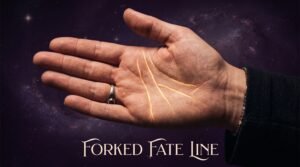 What Does a Forked Fate Line Mean in Palm Reading — And What It Reveals About Your Destiny
 What Does Mercury (Budh) in Your Kundli Reveal About Intelligence, Communication and Business Success?